Groundwork 2.1.46 is here: free for Windows, macOS and Linux.  ·  See what's new in 2.0 →  ·  Already using Groundwork? Updating keeps your records →
Free for Windows, macOS and Linux · Version 2.1.46

Your whole financial picture, explained. And nothing to sell you.

Groundwork is a free personal finance app that tracks your money, explains what it shows you, and never tries to sell you a loan, a card or a subscription. In 2.0 you can simply ask it - in plain words, typed or spoken - and it answers from your own records, with the math done by Groundwork, on your own computer. Built for everyone, wherever you're starting from.

No account. No subscription. No ads. Your data never leaves your computer.
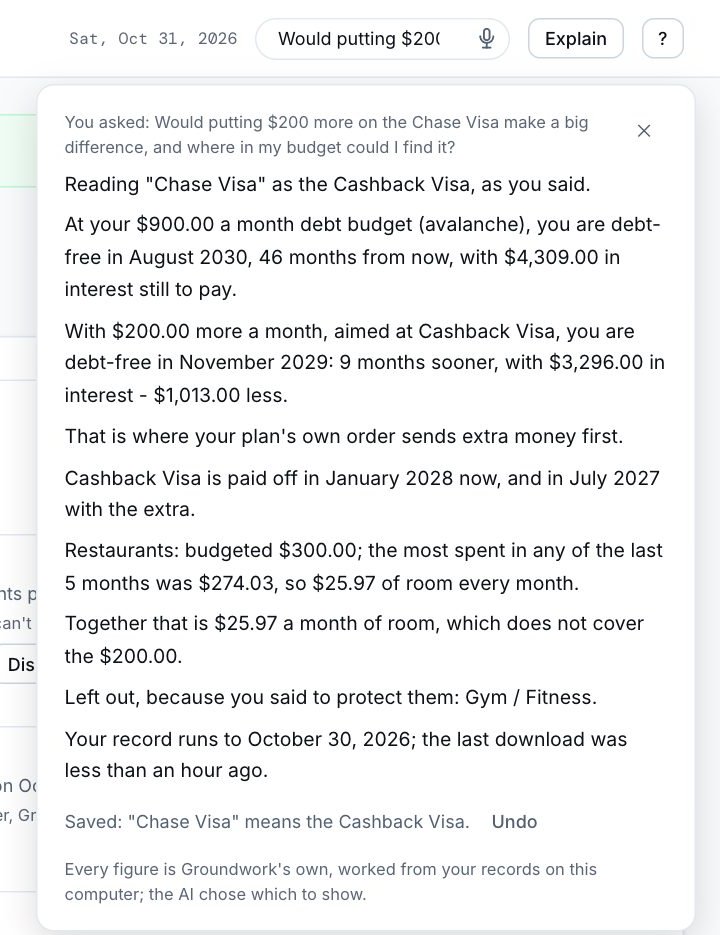
Groundwork's assistant answering: with $200 more a month on the Cashback Visa you are debt-free 9 months sooner, with $1,013 less interest, and the budget has $25.97 a month of room. Sample household, made-up figures.
New in 2.0 · the assistant answering, on a made-up sample household
New in 2.0 · Groundwork does the legwork

Your statements, fetched. Your bills, read. One press.

Show Groundwork your bank once. From then on, Get my accounts signs in, downloads your statement and hands it to you to review - straight from your bank to your computer, with nobody in between.

No more logging in to download files.

Groundwork opens your bank in a window of its own, signs in from your computer's password vault and follows the steps you showed it. When your bank texts you a code, the window comes to the front and you type it - Groundwork never reads a code. Every file waits in the import review, already matched to its account.

Your password never leaves your computer. No company sits between you and your bank.

How to set it up →

1:50
Get my accounts · sample household, made-up figures

The usual way apps get your bank data

You → an app's servers → a data company → your bank
  • Your bank account is linked through companies you've never dealt with.
  • Your transactions are copied onto their servers, and kept there.
  • It runs on their schedule, whether you asked or not.

The Groundwork way

You → your bank. On your computer.
  • Your login stays in your computer's own password vault: the macOS Keychain, Windows Credential Manager or your Linux keyring.
  • The file comes straight from your bank to your Downloads folder, and you review it before anything is saved.
  • It goes only when you press the button. It never pays, and every code is typed by you.
1:28
Bills read from the biller · sample household, made-up figures

Your bills, read straight from the biller.

The amount due and the due date, from the company's own site, beside what you planned. You confirm it. Groundwork never presses Pay.

1:13
Bring in your bank's file · sample household, made-up figures

Or bring in your bank's file yourself.

Download from any bank in CSV, OFX, QFX or QIF and import it. Lines you already have are recognised, so nothing is counted twice.

Try it yourself, on a made-up bank

Demo Credit Union lives on this website so you can watch Get my accounts work before you trust it with your own bank. Install Groundwork, choose the sample household, and open Assistant: the demo bank is already linked. Any username and password work.

Download free →
New in 2.0

See Groundwork 2.0 in short tours

The real app, on a made-up sample household, narrated and captioned. Press play on any of them.

1:21
Getting started · a new install, made-up figures

From a new install to your first plan.

Set up by hand in a few minutes: every question can be skipped, and nothing is assumed in its place.

1:12
Debt Payoff · sample household, made-up figures

Your path to zero.

The month you'll owe nothing, what a little extra changes, and what moves the date most. Nothing to sell you.

0:59
The assistant · sample household, made-up figures

Ask. Groundwork does the math.

Questions in plain words, answered from your own records. Every figure comes from Groundwork, never the AI.

1:32
The Health page · sample household, made-up figures

Health care costs, recorded, never judged.

Bills, your plan year, a health reserve and what care has cost, on one page.

1:09
Build your own report · sample household, made-up figures

Reports you ask for in your own words.

Stack sections, name the period, pick a style. It works with the AI turned off.

1:01
Private by design · sample household, made-up figures

Your money stays on your computer.

The AI, your voice and your backups, all kept on your machine, and the tests that hold it to that.

1:10
Possible futures · sample household, made-up figures

See the bad month before it comes.

Your next twelve months several ways, side by side, each saying exactly what it assumes.

0:58
Before You Buy · sample household, made-up figures

Know the whole cost before you buy.

What a purchase does to your month and your debt-free date, and the ways around it. Nothing to sell you.

Everything new in 2.0 →
New in 2.0

Ask. Groundwork does the math.

An assistant that knows your budget, your debts and your spending - because it reads your own records, on your own computer. It doesn't guess, it doesn't sell, and it can't make a number up.

"Would $200 more on my Visa make a difference?"

Groundwork looks up your debts, works out the payoff with the same engine as its Debt Payoff page, and checks every budget line against what you actually spent. Then it answers: how many months sooner, how much interest you'd save, and where in your budget the room is - or that there isn't enough.

Every figure is written by Groundwork from your records. The AI only chooses what to show - it never does the arithmetic, so it can't invent a number.

The assistant's answer: debt-free in November 2029 instead of August 2030, $1,013 less interest, and the Restaurants line has $25.97 a month of room. Made-up sample figures.
Sample household, made-up figures

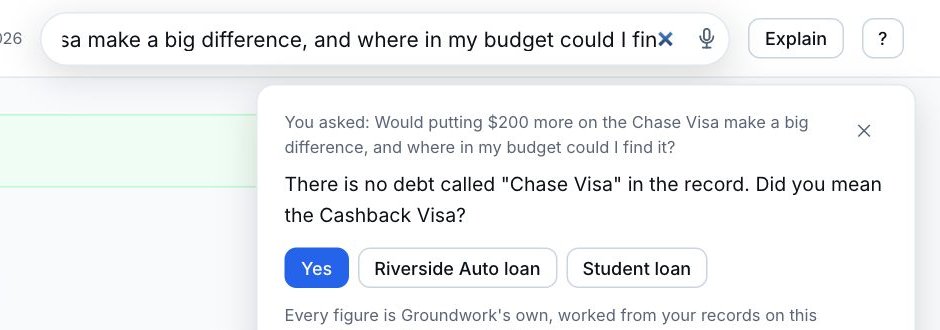
"Did you mean the Cashback Visa?"

Say "Chase Visa" when your card is the Cashback Visa, and Groundwork asks about the closest match instead of guessing. Your answer is kept, so it doesn't ask again - and you can see and remove every name it keeps.

When your records hold too little to answer, it says so, and tells you what would let it know.

The assistant asking: There is no debt called Chase Visa in the record. Did you mean the Cashback Visa? With Yes and the other debts as buttons. Sample household, made-up figures.
Sample household, made-up figures

"Move the Corner Market charges to Restaurants."

Ask it to file transactions, make an import rule, add or change a budget line, or mark a bill as recurring. Groundwork checks the change against your records and shows you exactly what would happen. Nothing changes until you press Yes - and Undo puts it back.

It can never move money, pay a bill, delete anything or change your settings. Those stay yours.

1:05
Groundwork does it, on your Yes · sample household, made-up figures

Tap the microphone. Have a conversation.

Turn on voice and the microphone sits in the Ask box. Tap it once and talk - it stays on until you tap it again, say "stop", or step away. Answers are read back to you in Groundwork's own words.

What you say is recognised on your computer and never sent anywhere or kept. Read-aloud and voice commands work even with the AI turned off.

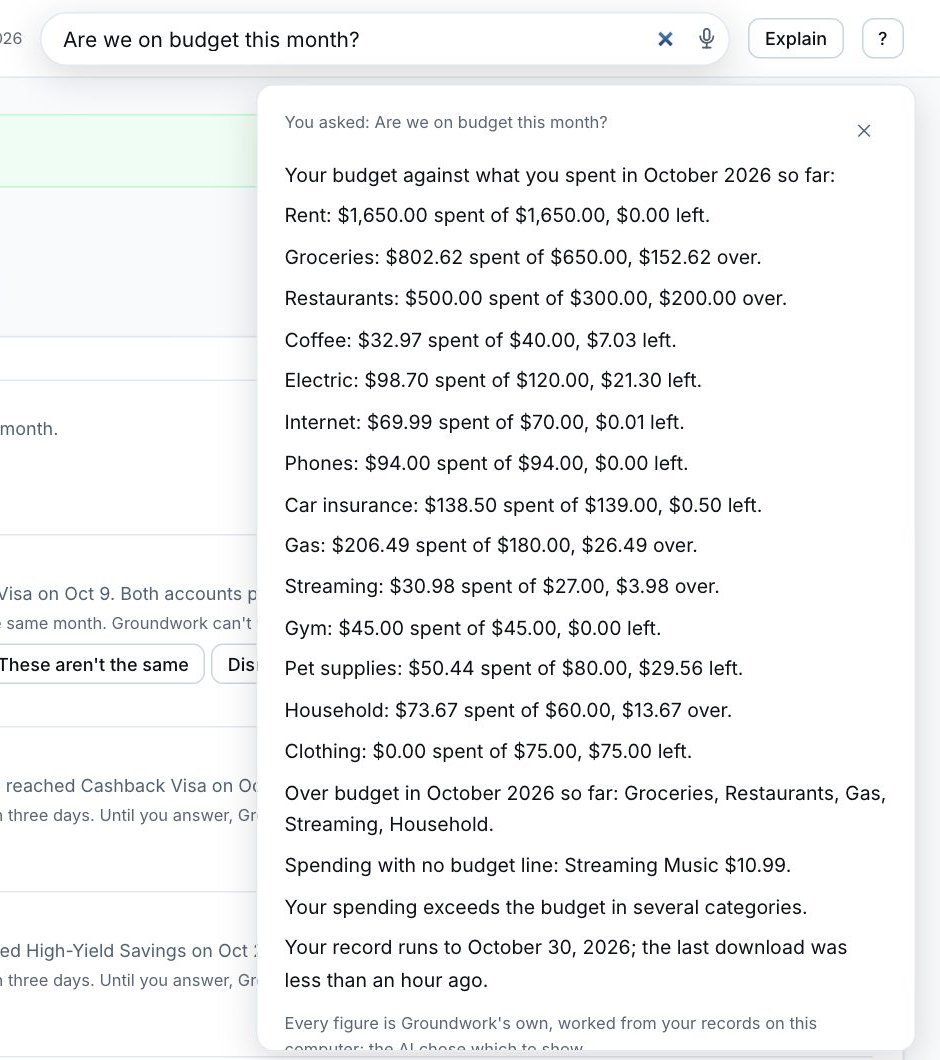
The answer to: Are we on budget this month? Every budget line beside what was spent, five over budget, listed by name. Made-up sample figures.
"Are we on budget this month?" - sample household, made-up figures

Savings goals that live inside your accounts

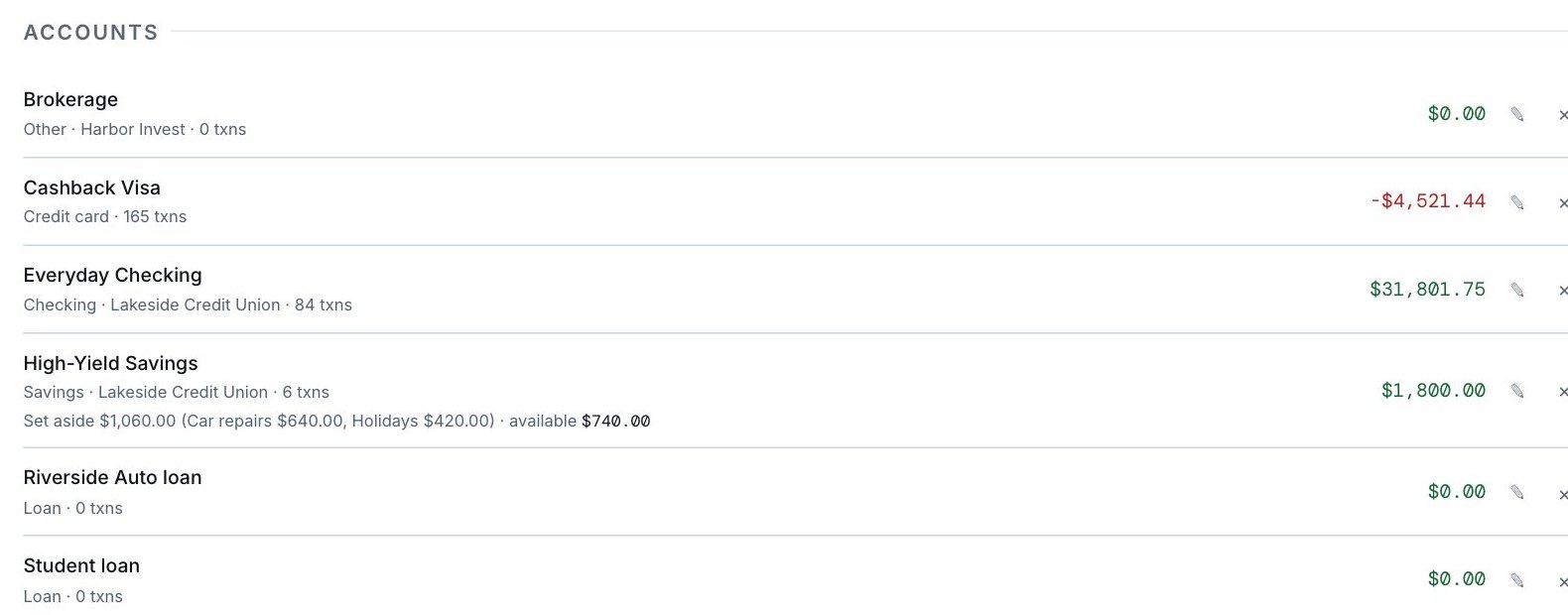
An emergency fund doesn't need its own bank account. Tell Groundwork which account holds it, and every account shows its balance, what's set aside in it, and what's actually available.

Planning a purchase? Groundwork asks "Have you set money aside for this?", uses that goal first, and shows where the rest could come from - including what it would add to your debt on a card.

Settings, Accounts: High-Yield Savings holds $1,800.00, with $1,060.00 set aside for Car repairs and Holidays, so $740.00 is available. Made-up sample figures.
Each account: its balance, what's set aside, what's available
Before You Buy: Have you set money aside for this? Holidays covers $420.00, the other $180.00 would come from available funds or the Visa as new debt. Made-up sample figures.
"Have you set money aside for this?" - sample household, made-up figures

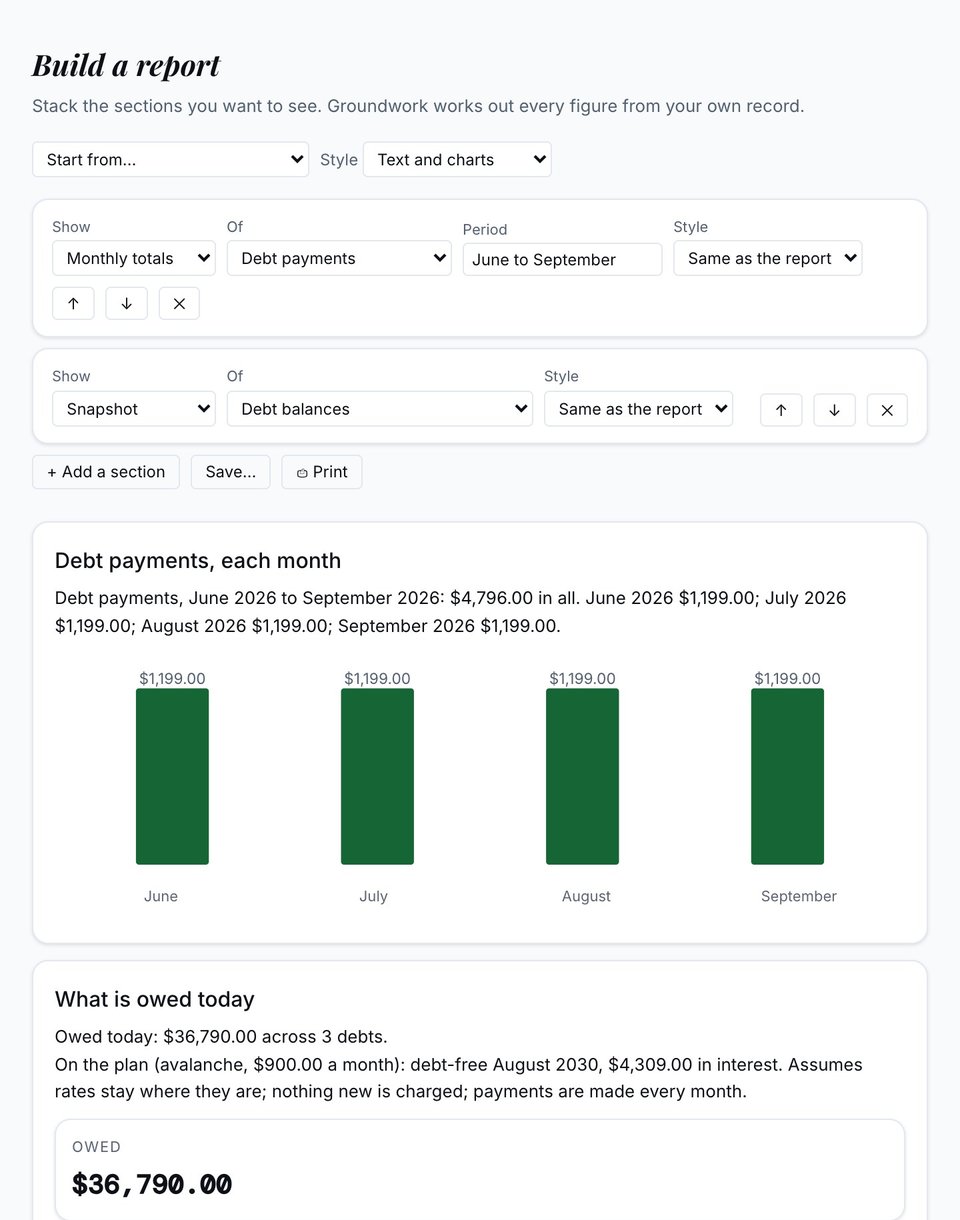
"Monthly totals of debt payments, June to September."

Stack the sections you want to see. Choose what to show - monthly totals, a trend, a list, a snapshot, a comparison or a what-if - and what it's about: spending, one category, payees, income, debt payments, debt balances, net worth, recurring charges, bills due or room in your budget. Say the period in your own words: "June to September", "last month", "this year".

Start from one of Groundwork's reports or from nothing, then pick how it looks: text and grid, text and charts, charts first, text only, print / PDF, or a compact summary. Save it, and next month it's ready again.

Every figure is worked out by Groundwork from your own records - with the AI on or off. When your records can't answer yet, the section says so and what would let it.

Build a report: Monthly totals of Debt payments for June to September - $4,796.00 in all, $1,199.00 each month, as bars - and a snapshot of what is owed today, $36,790.00, debt-free August 2030 on the plan. Made-up sample figures.
Two sections, text and charts - sample household, made-up figures
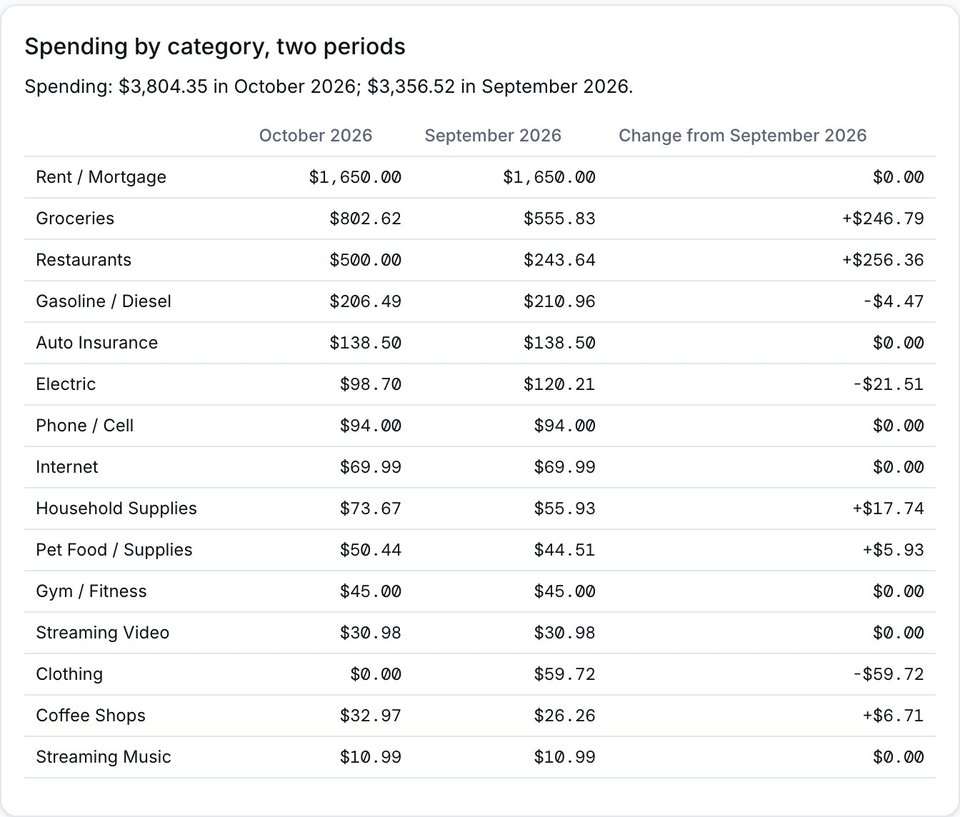
A comparison in the text and grid style: spending by category in October against September, with the change for each - Groceries up $246.79, Clothing down $59.72. Made-up sample figures.
A comparison, text and grid - sample household, made-up figures

An assistant with rules it can't talk its way out of

These aren't settings. They're how Groundwork is built, and its own tests fail if any of them is ever broken.

It runs on your computer

The AI ships inside Groundwork and runs on your machine. Nothing you ask is sent to an AI company. There is no cloud AI option.

It can't make a number up

Every figure in an answer is written by Groundwork from your records. The AI chooses which to show; it never does the math.

It never moves money

No payments, no transfers, no deletions, no settings. A change to your records needs your Yes, and comes with Undo.

It says when it doesn't know

"I can't say yet - your record has two months, and a pattern needs three." Then it tells you what would fix that.

Your questions aren't kept

A question is answered and forgotten. The AI log shows only which parts of your records were read, and when.

It can't be talked into anything

"Ignore your rules" is refused before the AI ever sees it - typed, spoken, or hidden in a bank memo. So is anything against the law.

Financial independence, for everyone

That's what Groundwork is for. Not one budget or one payoff date, but the long road to the point where your money supports the life you choose. Every feature is a step toward it, and every step is yours to take.

Four promises, kept in every screen

Groundwork is a full finance app, not a debt app with extras. Debt payoff is one tool in it: front and center if you're in debt, and never the definition of who you are.

It tracks everything

Budget, ledger, net worth, investments, debt and health care spending, built from your own bank files.

It explains what it shows

What a term means and how a number was worked out, so the next decision is easier to make on your own.

Health care is a cost, not a failure

Health care spending is tracked as its own category, and Groundwork doesn't suggest cutting it.

It has nothing to sell you

No loan, no card, no subscription, no ads, and no product behind the advice. The software is the product, not you.

Everything in one place, on your own computer

These all work in the version you can download right now.

Import from your bank

Bring in the CSV, OFX, QFX or QIF file your bank already gives you. Groundwork sorts it into categories and skips duplicates: no retyping.

A budget that follows your spending

See each budget line next to what you've actually spent this month, from your imported transactions.

Debt payoff planner

Snowball or avalanche: Groundwork lays out the payoff order and shows your debt-free date.

Net worth and investments

Everything you own minus everything you owe, tracked month by month, with your holdings at their prices.

Gift and seasonal planning

Every person and occasion in one list, with savings funds for the big ones, so the holidays aren't a surprise.

Trip planner

Price a trip from your own numbers: your car's mileage and gas prices if you drive, Google Flights if you fly.

Before You Buy

See what a big purchase does to your budget and your debt-free date before you decide. No lecture, just the numbers.

Reports you can print

Monthly spending, budget against actual, debt progress, net worth over time and more, each with a Print button.

Local AI, if you want it

Optional plain-English write-ups of your month, from an AI model that runs on your own computer. Nothing is sent anywhere.

See every feature →

Your money stays on your computer

Groundwork is a desktop app. Your transactions, balances, budgets and debts live in one file on your own machine. There's no account to make and no server holding your finances.

  • No account and no login
  • No telemetry, no analytics, no usage tracking in the app
  • No cloud AI: the AI runs on your computer or not at all
  • Your voice is recognised on your computer, never sent or kept
  • Uninstalling never deletes your data
What does leave your computer, and why
None of these carries a balance, a transaction or an amount.
Update checkasks whether there's a new version, and sends nothing about you
Investment pricesticker symbols, to Yahoo Finance
Utility and fuel pricesyour state, to the U.S. Energy Information Administration
Trip distancesthe places you type, to OpenStreetMap
Read the privacy policy →

The biggest update we've ever built

Beyond the assistant, Groundwork 2.0 does more of the work for you, explains more of what it finds, and still keeps every number on your computer.

Your statements, with one press

When you ask, Groundwork opens your bank's site and brings your statements back for you to review.

Ask why

A number looks wrong? Groundwork checks your records, tells you what it found, and shows any fix before it happens.

Possible futures

Your next twelve months side by side, including the rough ones, each saying exactly what it assumes.

Bills, read from the biller

The amount and due date from the company's own site, next to your budget. Groundwork never presses Pay.

A Health page

Medical bills, your plan, your deductible and a health reserve in one place. Nothing about your health leaves your computer. How it works →

A Sunday check-in

A short look at the week behind you and the week ahead: a paycheck due, a bill coming up.

See everything new in 2.0 →

For wherever you're starting from

Most finance apps are built for one kind of person. Groundwork is built for anyone who wants to understand their money: whether you're working out how to make rent and pay down a card, or deciding where your first $10,000 should go.

It started as one family's tool for getting their finances under control. It's free, and it will stay free.

Our story →
Price$0, always
Account neededNone
Where your data livesOn your computer
Ads, upsells, partner offersNone
Works onWindows, macOS and Linux

What people ask first

Is Groundwork really free?

Yes. Groundwork costs nothing, has no subscription, shows no ads and has no partner offers. There is nothing to upgrade to.

Does my financial data leave my computer?

No. Your transactions, balances, budgets and debts are stored in one file on your own computer. Groundwork has no account and no server holding your finances. The privacy policy lists the few facts it does fetch, like investment prices, and none of them carries a balance or a transaction.

Does the AI send my questions anywhere?

No. The AI model ships inside Groundwork and runs on your computer. Nothing you ask is sent to an AI company, there is no cloud AI option, and every page still works with the AI turned off.

Can the assistant make mistakes with my numbers?

Every figure in an answer is written by Groundwork from your own records, using the same engines as its pages. The AI only chooses which of those sentences to show, so it cannot invent a number. When your records hold too little to answer, it says it does not know yet.

Can Groundwork move money or pay my bills?

Never. It cannot pay, transfer, or delete anything. It can propose changes to your own records, like filing transactions under a category, and nothing happens until you press Yes.

Do I need to connect my bank account?

No. You import the file your bank already gives you (CSV, OFX, QFX or QIF). In 2.0 you can also ask Groundwork to open your bank's site and fetch your statements for you to review.

Which computers does it run on?

Windows, macOS on Apple Silicon, and Linux. The built-in AI wants about 8GB of memory; everything else runs without it.

Financial independence for everyone,
one understood decision at a time.

That's why Groundwork explains every number it shows you, and has nothing to sell you.

Start with Groundwork, free

Hear when Groundwork updates

One email when something worth knowing ships. No spam, and every email has a one-click unsubscribe.